
How to login to your account portal
You can now review and change your subscription information using the Eagle subscription portal. You can also read past issues which are a digital duplicate of the print newspaper.
To get started grab your latest copy of the Oregon Eagle and look at your address block on the bottom left of the front page.
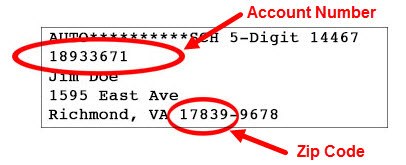
- Go to the Eagle subscriber portal by clicking here.
- Enter your Account Number and Zip Code as found on your mailing label. You can also find your account number in your "Thank you for subscribing!" email.
- Once inside your account portal, you now have access to important information about your subscription such as your expiration date and order history. You can also update your subscription information including:
- You can change your address if you move.
- You can update your email address and phone number.
- There is no reason to update your credit card information because the Oregon Eagle no longer charges for subscriptions. To support the work of the Oregon Eagle please click the "Donate" link in the top menu.
Need help with your subscription?
- Inside your account portal, click the Eagle email address at the bottom of the screen.
- Email us using our contact form.
- Call us at 541-200-6950.
"Those who expect to reap the blessings of freedom must, like men, undergo the fatigue of supporting it." Thomas Paine